Releasing PLC4X
TL/DR
We’ve mostly automated most of the steps and checks in the project’s tools directory.
The only prerequisite for this is generally having Docker installed as we’re using a reference machine to ensure reproducible builds.
Before anything else, check that your machine is actually able to do a release:
-
release-preflight.sh: Verifies the things a release needs - the tools, your git identity, a signing key that is usable and published in theKEYSfile, the Nexus and SVN credentials and enough disk space. It changes nothing, takes a minute, and saves finding out about an expired password an hour into the release.
In regular intervals and especially before starting the release process run:
-
release-0-update-generated-code.sh: Deletes all generated code and then re-generates it (Gets rid of no longer valid types), refreshes the generated driver documentation and updates the NOTICE year.
When starting the release process, create the release branch:
-
release-1-create-branch.sh: Finalizes the RELEASE_NOTES for the version being released and adds a new section for the next one, checks git is configured correctly and then runs the create-branch build in docker with all modules enabled.
Now usually comes a code stabilization time. As soon as that period is over or we’re not doing such a stabilization phase, prepare the actual release.
-
release-2-prepare-release.sh: Executes the actual release process using maven inside Docker. Signs the locally staged artifacts. Deploys them to Nexus and stages them in SVN. It also checks if the current RMs GPG key is contained in the KEYS file as well as the SHA512. As a last step it drafts an email for starting the vote containing all necessary information.
Preparing your system for being able to release
Be sure you are using a JDK and not a JRE, or the release will fail because the release can’t execute the javadoc executable.
|
As part of the release process, Maven will upload maven release artifacts to a so-called staging repository.
This can be thought of as an ad-hoc Maven repository that contains only the artifacts for one release. This helps reviewers to see what’s in the convenience maven package and to release that to the public repos with one click.
In order to be allowed to upload artifacts, your account has to be enabled for this, and you have to tell Maven about your credentials.
In order to do this, you should provide these credentials via .m2/settings.xml.
So if you don’t already have one, you should create a .m2 directory in your user home and inside that create a settings.xml file with at least this content:
<?xml version="1.0" encoding="UTF-8"?>
<settings xsi:schemaLocation="http://maven.apache.org/SETTINGS/1.1.0 http://maven.apache.org/xsd/settings-1.1.0.xsd" xmlns="http://maven.apache.org/SETTINGS/1.1.0"
    xmlns:xsi="http://www.w3.org/2001/XMLSchema-instance">
  <servers>
    <!-- Apache Repo Settings -->
    <server>
        <id>apache.snapshots.https</id>
        <username>{user-id}</username>
        <password>{user-pass}</password>
    </server>
    <server>
        <id>apache.releases.https</id>
        <username>{user-id}</username>
        <password>{user-pass}</password>
    </server>
  </servers>
</settings>
This tells maven to use above credentials as soon as a repository with the id apache.snapshots.https or apache.releases.https is being used.
For a release all you need is the releases repo, but it is good to have the other in place as it enables you to also deploy SNAPSHOTs from your system.
There repos are defined in the apache parent pom and is identical for all Apache projects.
Additionally, all artifacts are automatically signed by the release build. In order to be able to do this you need to set up GPG.
The key being used to sign the artifacts will have to be linked to your Apache E-Mail ({apache-id}@apache.org) and verified by at least one fellow Apache committer (Ideally more) that have trusted keys themselves.
Usually for this you have to get in touch - in real life - with any Apache committer with a trusted key.
Attending an ApacheCon is usually a great way to do this as usually every ApacheCon has a Key Signing event in its schedule.
He can then sign your key and hereby enable you to sign Apache release artifacts.
There’s a detailed description here.
However, in contrast to that documentation, upload your key to the following servers: pool.sks-keyservers.net and keyserver.ubuntu.com as these are the ones Nexus is checking.
|
If you happen to have multiple keys, adding the following profile to your settings.xml should help:
<profile>
  <id>apache-release</id>
  <properties>
    <gpg.keyname>5C60D6B9</gpg.keyname><!-- Your GPG Keyname here -->
    <!-- Use an agent: Prevents being asked for the password during the build -->
    <gpg.useagent>true</gpg.useagent>
    <gpg.passphrase>topsecret-password</gpg.passphrase>
  </properties>
</profile>
The Java version the release is built with is not yours to pick: every Maven build the release scripts run happens inside the container described by tools/docker-compose.yaml, and its image (azul/zulu-openjdk:21) pins it to Java 21.
That is the whole point of the reference machine - the artifacts must not depend on what you happen to have installed.
On the host you still need a Java 21 JDK, because the prerequisite check of the build requires at least that version, and the scripts run Maven on the host for the steps that do not belong in the container.
The minimum Maven version is 4.0.0-rc-5, which the root pom.xml enforces.
Ideally use the Maven-Wrapper, which pins exactly that version, so the question does not come up.
|
On some systems (mainly Mac) gpg signing can result in errors like: [INFO] --- maven-gpg-plugin:3.0.1:sign (sign-release-artifacts) @ plc4x-parent --- gpg: signing failed: Inappropriate ioctl for device In this case adding the following helps: |
The release scripts
From here on, the release is driven by the numbered scripts in the project’s tools directory.
They are meant to be run in order, and each one prints which script to run next when it finishes.
| Script | What it covers |
|---|---|
|
Checks the preconditions of a release without changing anything. Run it first. See Checking your system is ready. |
|
Throws away and re-generates all generated code, refreshes the driver documentation and the |
|
Finalizes the |
|
Tags and builds the release, signs and stages the artifacts in Nexus and SVN and drafts the |
|
Everything after a successful vote: publishes the documentation of the release branch as the
current release, adds the branch to the website build, records the release in the DOAP file and on
the download page of both branches, drafts the |
|
Helps unwinding a failed attempt. |
|
Verifies a staged release candidate builds reproducibly. Mainly for the people voting. |
All Maven builds these scripts run happen inside the Docker container described by tools/docker-compose.yaml, which bind-mounts the project at /ws and uses out/.repository as its local Maven repository.
That is what makes the build reproducible, and it is why the outcome does not depend on what is installed on your machine.
Docker needs at least 12 GB of memory. release-0-update-generated-code.sh and validate-release.sh check this up front and abort if less is configured.
|
Every script aborts immediately if git status reports uncommitted or untracked files, because they all commit with git add --all and would otherwise sweep up unrelated changes.
Start each step from a clean checkout.
|
Note that the signing in release-2-prepare-release.sh and all git and svn operations run on your machine, not inside the container.
So GPG, your git credentials and your Apache SVN credentials all have to work on the host.
Which remote the release is pushed to
The release branch, the release tag and the updated develop and release branches all have to end up in the Apache repository, and that repository is not necessarily the remote called origin.
Anybody who followed the contributing guide has their own fork as origin and the Apache repository under a second name, usually upstream.
So the scripts do not go by the name: they look through the remotes of your checkout for the URL of the Apache repository - gitbox.apache.org/repos/asf/plc4x or the GitHub mirror github.com/apache/plc4x, over ssh or over https - and use the one that matches.
If none of them matches, or if more than one does, every script that touches the remote stops before doing anything and prints the remotes it found.
To settle it yourself - for a mirror, or when several remotes point at the Apache repository - name the remote explicitly:
export PLC4X_REMOTE=upstream
The remote has to use ssh
Everything a release pushes - the release branch, the release commits, the release tag, the merges back into develop and release - goes out through these scripts, spread over a run that takes the better part of an hour.
Over https every single one of those needs a password or a credential helper, in the middle of the release; with an ssh key the agent already holds, none of them needs anything.
The release container itself has no credentials at all, which is why release:prepare is run with -DpushChanges=false and the pushing is left to the host.
So the remote has to be an ssh one:
git remote set-url origin git@github.com:apache/plc4x.git
and the key it uses has to be one the agent can offer without asking, which usually means adding it before starting a release:
ssh-add ~/.ssh/id_ed25519
release-preflight.sh checks both: that the Apache remote is an ssh URL, and that the host actually accepts the key, reporting the account it greets you as.
That last part matters - it is the account the release ends up being pushed as.
Checking your system is ready
Almost everything that has gone wrong with a release so far was a precondition that could have been checked in seconds: a Nexus password that had expired, a signing key that is not in the KEYS file, a gpg agent that cannot sign without asking for a passphrase.
A release runs for the better part of an hour, so those are expensive minutes to lose.
./tools/release-preflight.sh
The script only reads: it creates no commit, no tag, no staging repository and no SVN directory, so it is safe to run at any time - while setting your system up for the first time, or right before starting a release. None of the other scripts call it, so running it is up to you.
It checks:
| Area | What it checks |
|---|---|
Tools |
|
Git |
|
Signing |
A secret key is available ( |
Nexus |
The |
SVN |
The |
Resources |
At least |
Checks do not stop at the first problem - the point is to see everything that needs fixing in one go, so the script always runs to the end and prints a summary.
Findings come in two flavours: a ⚠️ warning is something to be aware of, a ❌ failure is something that will stop the release, and only the latter makes the script exit non-zero.
Pass --offline to skip everything that needs the network (the push, KEYS, Nexus and SVN checks).
A green run means the preconditions hold, not that the release will succeed.
Read access to SVN does not prove you may commit, and an accepted git push --dry-run does not prove the branch protection rules in .asf.yaml will let the real push through.
|
Preparing the codebase for a release
Run this in regular intervals during development, and definitely before starting a release:
./tools/release-0-update-generated-code.sh
It performs the following steps:
-
Deletes the
outdirectory, which holds the Maven local repository and the artifacts of previous deployments. -
Deletes all generated code, and then re-generates it by running a full build with all profiles and
update-generated-codeenabled. This is the point of the script: types that are no longer produced by the code generation would otherwise stay behind and silently become part of the release. Hand-written files that live next to the generated ones are kept (StaticHelper.go,StaticHelper_test.go,StaticHelper.py,init.py). -
Sets the second line of the
NOTICEfile toCopyright 2017-<current year> The Apache Software Foundation, which takes care of the yearly update. -
Re-generates the driver documentation by running
mvn site -pl :plc4j-driver-all. -
Commits everything that changed as
chore: updated generated codeand pushes it.
The build in step 2 runs with tests skipped, so a green run of this script says the project still compiles and generates - not that it still works.
Updating the RELEASE_NOTES
This part is not automated and has to be done before creating the branch, because otherwise you will have to port it back to develop afterwards.
Fill in the section for the version you are about to release: go through what has been merged since the last release and complete the New Features, Incompatible changes and Bug Fixes blocks.
You do not have to touch the (Unreleased) Apache PLC4X <version>-SNAPSHOT header or add a section for the next version - release-1-create-branch.sh does both.
Creating a release branch
According to SemVer, we have Major, Minor and Bugfix releases.
For each new Major and Minor release we create a branch at the beginning of the code-freeze phase, and that is also the moment the version on develop is incremented.
./tools/release-1-create-branch.sh
The script derives every version it needs from the current project version, so there is nothing to type in except one confirmation.
For a develop sitting at 1.0.0-SNAPSHOT that gives:
| Value | Example | Derived as |
|---|---|---|
Release version |
|
project version without |
Branch name |
|
release version without a trailing |
New |
|
release version with the minor segment incremented |
It then:
-
Asks
Have the RELEASE_NOTES been updated for this version?. Anything other thanyesaborts. -
Rewrites the
(Unreleased) Apache PLC4X 1.0.0-SNAPSHOTheader in theRELEASE_NOTEStoApache PLC4X 1.0.0and commits that. -
Checks that
user.nameanduser.emailare configured in git, and prints the commands to fix it if they are not. The commit is created inside the container, so it needs these values passed in explicitly. -
Runs
mvn release:branchinside the container with-DpushChanges=false, with all profiles enabled.Enabling all profiles is what makes the plugin update the versions of the non-default modules too. Without that, those modules on developwould keep referencing the old version and the build would break. -
Prepends a fresh
(Unreleased) Apache PLC4X 1.1.0-SNAPSHOTsection to theRELEASE_NOTESand commits it. -
Pushes
develop, checks outrel/1.0and pushes that with--set-upstream.
When this is done, your local checkout is on the release branch and develop has moved on to the next minor version.
Afterwards do a quick full-text search for the old version to check it was updated everywhere.
| If you find anything here, you will need to pay attention during the release. |
How the documentation version is maintained
You do not have to do anything here - release-1-create-branch.sh takes care of it - but it is
worth understanding, because it is the part that decides which version the website serves as
the current one.
Every branch names the concrete version it documents in its own website/asciidoc/antora.yml,
and marks whether that version is released yet:
| Branch | version: |
prerelease: |
Published as |
|---|---|---|---|
|
|
|
|
|
|
|
|
|
|
|
|
|
|
|
|
A release branch does not start out like that, though.
release-1-create-branch.sh creates it with prerelease: True, because at that point nothing has been voted on yet.
While the code freeze and the vote are running, none of it is published at all: Antora only reads
the branches listed in content.sources in website/antora-playbook.yml, and the new branch is
only added there by release-3-finish-release.sh, after the vote.
/plc4x/latest/ therefore keeps serving the previous release throughout.
The prerelease flag matters at the moment the branch is added.
Antora skips prereleases when it picks the latest version, so a branch added while still flagged
would appear under its own version number instead of taking over /plc4x/latest/.
release-3-finish-release.sh adds the branch and clears the flag in the same run, and that is what
promotes the new release to /plc4x/latest/ and moves the previous one to its own version number.
No branch names itself latest or pre-release.
Those two segments come from the playbook instead:
urls:
  latest_version_segment: latest
  latest_prerelease_version_segment: pre-release
Antora picks the latest version of a component by version sorting and skips prereleases while
doing so, then publishes that one under the symbolic segment.
develop can therefore never become latest, and creating a newer release branch demotes the
previous one to its own version number without anything on that older branch having to change.
release-1-create-branch.sh moves develop on to the next version and sets the new release branch to the version it is going to release, both still flagged as prereleases.
release-3-finish-release.sh takes the version from the tag release-2-prepare-release.sh created and clears the prerelease flag, so it also does the right thing for a bugfix release, where release-1-create-branch.sh never runs.
The two current-*-version attributes further down in the same file are kept in sync by the
build and should not be edited by hand either.
Release stabilization phase
Now usually comes a phase in which last tests and checks are performed.
If any problems are found, they have to be fixed in the release branch.
Changes should either be re-applied in develop or cherry-picked.
Merging things back causes a lot of problems, as the branches no longer share the same versions.
Preparing and staging a release candidate
As especially when switching a lot between different branches, it is recommended to do a clean checkout of the repository. Otherwise, a lot of directories can be left over, which would be included in the source-release zip.
Make sure you are on the release branch, then run:
./tools/release-2-prepare-release.sh
This is the long one - it takes the release from a tagged commit all the way to a staged release candidate and a drafted vote mail. The only thing it asks for is the release-candidate number.
Before it does anything, it derives the release version (1.0.0), the tag name (v1.0.0) and the next development version (1.0.1-SNAPSHOT - note this is a bugfix bump, unlike in release-1), and it refuses to continue if the tag already exists locally or on the Apache remote, telling you exactly how to remove it.
This is the usual outcome of an earlier failed attempt.
It then works through these steps:
-
Runs
mvn release:preparein the container with all profiles enabled and the versions and tag passed in explicitly, so the plugin asks no questions. This checks that noSNAPSHOTdependencies are referenced, updates all poms, runs a full build with tests, commits, tags and prepares the next development version. It runs with-DpushChanges=false: the container has no credentials, so the commits and the tag stay local for now. -
Pushes the release commits and then the release tag, and records the commit hash the tag points at, for the vote mail. The tag has to be pushed before the next step, which checks it out from the remote rather than from your working copy.
-
Runs
mvn release:performin the container, deploying intoout/.local-artifacts-dirrather than straight to Nexus. Nothing leaves your machine yet. -
Signs every artifact in that directory with
gpg -ab- poms, jars, kars, nars, feature and site descriptors, the CycloneDX SBOMs and the source-release zip. This runs on the host, using your GPG setup. -
Uploads the signed repository to Nexus with
nexus-staging:deploy-staged-repositoryand closes it, then prints the URL of the closed staging repository.If this fails with a 404, the staging profile id hard-coded in the script is out of date. Log in to https://repository.apache.org, openStaging Profiles, selectorg.apache.plc4xand take the id out of the browser URL after#stagingProfiles;. -
Asks for the release-candidate number and assembles
out/stage/<version>/rc<n>/containing theREADME, theRELEASE_NOTES, the source-release zip with its.ascand.sha512, and the CycloneDX SBOMs with their signatures. -
Downloads the official KEYS file, imports it into a throw-away keyring, verifies the signature against it, and checks that the key which made the signature carries an
apache.orgaddress.These are the checks that catch the classic first-time-release-manager mistakes. If the first fails, your key is not in the KEYSfile yet - add it, following the format documented in the file itself. If the second fails, you signed with a key that is not registered to your{apache-id}@apache.orgaddress; the script prints the user ids the key does carry. A key may have several user ids and only one of them has to be the Apache one. -
Re-computes the SHA-512 of the source-release zip and compares it against the
.sha512file. -
Imports the release-candidate directory into the Apache dev SVN with
svn import, which gives the layout the vote mail refers to:https://dist.apache.org/repos/dist/dev/plc4x/1.1.0/rc1/README https://dist.apache.org/repos/dist/dev/plc4x/1.1.0/rc1/RELEASE_NOTES https://dist.apache.org/repos/dist/dev/plc4x/1.1.0/rc1/apache-plc4x-1.1.0-source-release.zip https://dist.apache.org/repos/dist/dev/plc4x/1.1.0/rc1/apache-plc4x-1.1.0-source-release.zip.asc https://dist.apache.org/repos/dist/dev/plc4x/1.1.0/rc1/apache-plc4x-1.1.0-source-release.zip.sha512
-
Writes
out/stage/vote-email.emlandout/stage/discuss-email.eml, already filled in with the release version, the RC number, the tag commit hash, the staging repository URL and the SVN URL.
Verifying the git history
Even though this is now scripted, it is worth checking that the repository at https://gitbox.apache.org/repos/asf?p=plc4x.git ended up in the right state. Select the release branch and verify the commit log looks like this:
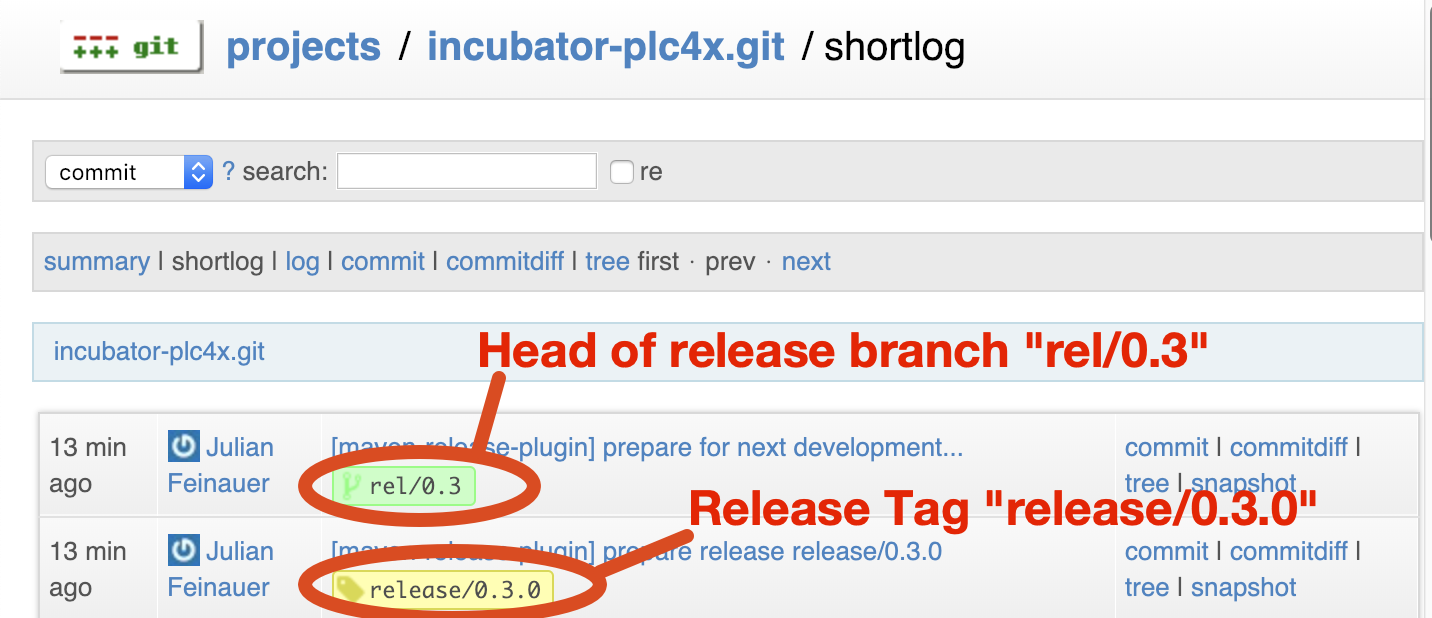
The commit with the message [maven-release-plugin] prepare release v1.1.0 has to carry the release tag, and it should consist of nothing but version updates.
It is followed by a [maven-release-plugin] prepare for next development iteration commit that moves the branch on to the next bugfix version.
| If the commit history doesn’t look like this, something went wrong. |
Starting a vote on the mailing list
The two mails were drafted for you in out/stage/.
Read them once, then send them - the [VOTE] mail from vote-email.eml and the [DISCUSS] mail from discuss-email.eml, both to dev@plc4x.apache.org.
The reason for the second mail is that counting votes gets hard if the voting and the discussion happen in the same thread.
Now we have to wait 72 hours before the result can be announced. This is an Apache policy, so that anyone can participate no matter where they live or what weekends and public holidays are currently happening.
The vote passes if at least 3 binding +1 votes are received and more +1 than -1.
After the 72 hours are over and that requirement is met, the vote is closed with a reply to the
vote thread, prefixed [RESULT].
release-3-finish-release.sh drafts that mail for you - it asks for the two vote counts and writes
out/stage/result-email.eml, before it publishes anything, so you get it even if you stop the
script at the confirmation.
Validating a release candidate
Anyone voting can check that the staged artifacts really are reproducible from the staged sources:
./tools/validate-release.sh
It builds the project in the same container and then uses artifact:compare against the staging
repository to compare the result byte for byte.
Run it inside an unpacked apache-plc4x-<version>-source-release.zip, or in a checkout of the
release tag - it refuses to run on a SNAPSHOT version, because comparing a development build
against a release repository says nothing about the release candidate.
Only the Java artifacts are compared; the C, .Net and Python ones are either platform specific or
not published to Maven at all.
The full list of things a voter is expected to check is documented on the validating a release page.
What if something goes wrong?
tools/release-abort.sh helps with unwinding an attempt:
-
Sets the versions in all modules back to the development version. Which version that is cannot be derived - after
release:branchthe poms hold the next minor version, afterrelease:preparethe next bugfix version - so pass it as an argument or answer the prompt:./tools/release-abort.sh 1.0.0-SNAPSHOT
-
Deletes the left-over
release.properties,pom.xml.versionsBackupandpom.xml.releaseBackupfiles. -
Offers to delete the release tag and the release branch, locally and on the remote, asking separately for each and skipping the ones that do not exist.
It does not undo everything. Commits release-1-create-branch.sh already pushed to
develop - the finalized RELEASE_NOTES, the section for the next version and the documentation
version in website/asciidoc/antora.yml - stay, as does a release candidate staged in SVN and a
Nexus staging repository. The script lists those at the end so they are not forgotten; the next
section covers removing them.
|
Going back for a new release candidate
If a vote fails and a new RC is needed:
-
Run
tools/release-abort.shto reset the versions and clean up the left-over files. -
Delete the tag locally and remotely:
   git tag -d v1.1.0
   git push --delete origin v1.1.0
-
Commit and push the version changes.
-
Drop the staging repository at https://repository.apache.org.
-
Remove the previous RC from SVN:
svn rm https://dist.apache.org/repos/dist/dev/plc4x/1.1.0/rc1 -m"Removed rc1 of PLC4X 1.1.0"
-
Reply to the
VOTEandDISCUSSthreads announcing that the vote has been cancelled, explaining why and that a new RC will follow. Prefix the subject with[CANCELLED].
After this you can run release-2-prepare-release.sh again and give it the next RC number.
After a successful vote
tools/release-3-finish-release.sh covers this part.
Run it on the release branch once the vote has passed - it refuses to run anywhere else, because everything it does writes to that branch.
It asks for confirmation, then takes the released version from the release tag and does five things:
-
On the release branch: points the Antora descriptor at that version and clears the
prereleaseflag, which is what publishes the new release as/plc4x/latest/, and adds the release to that branch’s download page. -
On
develop: adds the release branch to thecontent.sourceslist inwebsite/antora-playbook.yml, which is what makes Antora read the branch at all. -
On
develop: adds the released version towebsite/resources/plc4x-doap.rdf, at the top of the list and namedLatest, demoting the entry that held that title toLegacy, and adds the release to `develop’s copy of the download page. The release date is the day the script runs. -
Drafts the
[RESULT]and[ANNOUNCE]mails intoout/stage/, the same wayrelease-2-prepare-release.shdrafts the[VOTE]and[DISCUSS]ones. Nothing is sent - you read them and send them yourself. -
Publishes the artifacts and clears away what the earlier attempts left behind - see Releasing the artifacts. This asks for a second confirmation, because it cannot be undone.
The two changes to develop are made in a throw-away worktree and pushed straight to it, so your
checkout stays on the release branch - your local develop will be one commit behind afterwards.
The documentation steps are skipped if they have already been done, so re-running the script is harmless up to the point where it starts publishing - and that part asks first.
| Everything else in this section still has to be done by hand. |
Releasing the artifacts
release-3-finish-release.sh does this, and it is the point of no return - neither half can be
undone, which is why it asks once more before going ahead, showing exactly what it is about to do.
It works out which release candidate to publish by taking the highest numbered rc still staged
under https://dist.apache.org/repos/dist/dev/plc4x/, then:
-
Moves that release candidate to
https://dist.apache.org/repos/dist/release/plc4x/, which is what starts the artifacts being copied to the mirrors. This is why you have to wait at least 24 hours before announcing. -
Releases the Nexus staging repository with
nexus-staging:rc-release, moving the Maven artifacts into the Apache release repository, from where they are synced to Maven Central.
The staging repository id is read from the file release-2-prepare-release.sh left in
out/.local-artifacts-dir.
That directory does not survive release-0-update-generated-code.sh and is not there at all if
you finish the release on a different machine, in which case the script asks for the id - it is the
last part of the URL in [1] of the VOTE email, e.g. orgapacheplc4x-1234.
The SVN move is skipped if the version is already published. Nexus has no equally cheap way of being asked, so if the release is already out in SVN the script assumes the staging repository went with it and asks before trying again - which is also how you recover from a run where the move succeeded but the Nexus release did not.
Cleaning up afterwards
Only the winning release candidate was moved, a vote that had to be repeated leaves a closed staging repository behind for each attempt, and Apache policy is that the mirrors carry only the current release. The script offers to clear all three away, asking before it deletes anything:
-
It lists what is left under
https://dist.apache.org/repos/dist/dev/plc4x/1.1.0/and offers to remove that whole directory. -
It lists the older releases still under
https://dist.apache.org/repos/dist/release/plc4x/and offers to remove them. Only directories that look like a version are considered -KEYS,build-toolsandplc4x-extraslive in the same place and are left alone. -
It runs
nexus-staging:rc-listand prints the staging repositories that exist, then asks which ids to drop. Nexus gives us nothing we could reliably use to tell which repository belonged to which attempt, so this one is left as a decision rather than guessed at - leave the answer empty to keep them all.
Removing an older release does not make it unavailable: it stays on https://archive.apache.org/dist/plc4x/, and https://downloads.apache.org redirects there for anything it no longer carries, so the links on the download page keep working.
Updating the website
release-3-finish-release.sh does all of this.
Old releases are not dropped from the Antora playbook automatically, though - decide for yourself
how many versions of the documentation the website should keep building. That is separate from
the mirrors, which only ever carry the current release.
The download page is worth a word, because it exists once per branch that publishes documentation
and every copy has to list the release: /plc4x/latest/users/download.html is served from the
release branch, /plc4x/pre-release/… from develop.
The script updates both, identically.
For each copy it moves the entry that was current down into Previous Releases, pointing its
source-release link at the archive, and puts the new release at the top of Current Releases with
an anchor for the ToC.
The release notes are taken from the RELEASE_NOTES of the release branch and converted to
AsciiDoc.
A bullet that is wrapped over several lines in the RELEASE_NOTES becomes a single line on
the download page. That is deliberate: a continuation line starting with something like
18446744073709551615. would otherwise be read as an ordered list item by AsciiDoc. It renders the
same either way.
|
Notifying the world
Make sure you have given the Apache mirrors time to fetch the release files by waiting at least 24 hours after moving the release candidate to the release part of the SVN.
release-3-finish-release.sh has already drafted the announcement to out/stage/announce-email.eml,
addressed to announce@apache.org with dev@plc4x.apache.org in copy.
| The lists of drivers and integrations in that mail are a fixed text in the script, not generated from the build - read them before sending and correct them if they have drifted. |
It is important to note that you have to send this email from your apache email address, or it will be rejected. This wasn’t very simple for me to set up. A general description can be found here: https://reference.apache.org/committer/email Here’s what I did in Google Mail to allow sending of emails: https://gmail.googleblog.com/2009/07/send-mail-from-another-address-without.html Note … you will be able to select the alternate sending address if you click into the recipients line of a new email (Not very intuitive).